Showing posts with label shopping. Show all posts

Friday, January 19, 2018

Better SL Living Through Modding - CRAnQ Scrapper's Retreat

I do a LOT of modding. It's safe to say I have modded every modifiable item I've ever purchased in SL, and so I'm going to be posting a series of articles where I showcase some of the items I've modded, how I did it, and what the benefits were!


This first article features a wasteland shack in a sim I was commissioned to build. It's the Scrapper's Retreat from CRAnQ. A gorgeous looking piece, but out of the box it has a few problems. Namely, it's 241 LI cost and the fact that it uses about 360MB of VRAM in textures alone.

 Up front I want to say that none of this should be taken as a negative view of the creator's work. It's a gorgeous looking building and, sadly, these issues are not widely discussed in SL's content creator community so a lot of people simply don't realize they're issues at all. What you should instead take away from this the awesome thing CRAnQ did, selling the building with modify perms! That is what allowed me to take this great wasteland piece they put together and make it even better, and I thank them for giving me that option.

 In addition, I hope that if they see this article they are able to see what I've done, see how it improves the SL experience, and are able to work these improvements into their future creations!

Reducing Land Impact

 Now, Land Impact cost is easy to understand for anyone who owns or rents land in SL. You only have so much so you want to reduce LI wherever you can so you can fit more content and more detail in your sim. Luckily, this shack is copy/mod so I was able to do exactly that, and easily!

 First, the shack comes with an array of light sources. They're scripted and add a really great effect but a nearly identical lighting effect can be achieved by replacing the 40 light projectors with 4, and giving the side projectors a light map that mimics multiple sources. (Maybe I'll show how to di this in the future!) I went the simpler route for now and just got rid of the light projectors and did some simple local lighting, but recreating the original light effect is on my to-do list.

 Second, the lightbulbs strung along the side were each individual objects. Even worse, they're sculpted prims! If you're not aware, each sculpted prim costs 2 land impact points when linked to mesh! I replaced those with a string light mesh I bought off the marketplace. Took seconds to swap them out. Saved a bunch of LI. In addition, the wall mounted lamps on each side of the roof used a prim sphere overtop a mesh lightbulb, possibly because they didn't know how to script fullbright/glow changes to only the lightbulb part of the lamp mesh. I got rid of the prims and just set the mesh bulbs to glow manually.

 All of this means I lose the scripted lights on/off feature but I don't really need it.

 Next, I realized that by setting the entire building to "no physics" and replacing the physics with an invisible shell of box prims set to "convex hull" I was able to save yet more land impact.  This doesn't always work, but it works often enough to give it a try and here it ended up saving me a tonne of Land Impact points.


 And finally, the building was way too large so I shrunk it down to proper scale for the sim, reducing the land impact even further. Larger mesh objects cost more LI because they retain their higher LOD levels over greater distances the larger they are. Most content is made around twice the size it should be if everything is to scale with inworld measurements. Shrinking your avatar to human sizes and adjusting your camera so it doesn't need so much more space for you to see properly really helps you save a lot of space and money. If you ever thought land in SL was too expensive, this is the easiest way to cut the cost of land drastically.

 Doing these simple things I reduced to LI cost of the structure from 241 to 123. About half. Still a lot for a single structure, but given the sheer amount of detail I'm a lot more comfortable with it.

Reducing VRAM/Texture Use

 VRAM/Texture Memory is less common knowledge in SL but I'll try and summarize. Your graphics card has a set amount of memory to use rendering what you see in SL. All the textures you see have to be in that memory to be displayed, but so much more relies on that memory so you cannot max your card's memory out on textures alone or you see massive framerate losses and "texture thrashing". Texture thrashing is when you see textures going blurry and re-rezzing. You also have to download all these textures, which contributes to lag and slow rez times.

 360MB might not sound like a lot of memory, but it's only one building in an entire sim and then you throw avatars and their memory use into the mix. My videocard only has 2GB of VRAM. It's a midrange card, a few years old. Newer, more expensive cards have up to around 8GB. Onboard graphics have very little, if any, dedicated memory.

 Following so far? Ok, good!

This scrap house is covered in various unique corrugated metal panels. They're not identical. Out of the box there's like 6-12 different panels each with it's own texture, spec map and normal map. All of which are 1024x1024.  Each texture uses 4MB of memory on its own and it's simple arithmetic to see how that adds up.

 What I did was remove every type of panel except 2. Then I copied the remaining 2 panels to replace each of the panels I removed. Not difficult, but a little tedious and time consuming. But worth it! I was able to reduce the memory load of the house from 360MB down to 207MB. Here's a screenshot from the marketplace listing showing the original texture variety so you can compare. Yes, it's a little more detailed, but that detail comes at a cost in framerates, lag, and texture thrashing. What's more, are people going to notice the difference? Those who saw this building in my sim before and after did not notice the change until I pointed it out to them myself.


 You might be able to do the same if you notice items in your sim are similar, yet use different textures! Many SL buildings, for example, will have nearly identical textures for walls, floors, etcetera, where the only differences are slight variations in shading or colour that most people will never even notice! You can compare textures in the preview window of the texture chooser tab of the SL editing panel and see if this is the case, then it's a simple matter of unlinking pieces, and copying the one instance to replace the pieces with the redundant textures! In some buildings this is easy, in some buildings all of the walls may be a single mesh object which means you'll have to look for an alternative solution, such as replacing the textures entirely with one of your own.

 I also noticed that this house used the same stair kit as another building I have in the sim, but different textures. I swapped out the stairs with the identical stairs from the other house to reduce the sim's VRAM load further! And other buildings in the sim also use corrugated metal panels, I replaced them all with one of the two metal panels from this house and probably cut another 100-200MB of memory out of the sim. All of this means visitors to the sim get to experience higher framerates, less lag, little if any texture thrashing and fast rez times!

 And I hope the rest of you are able to implement these ideas into your own homes, clubs, RP sims, and other environments and improve your own SL experience! I'll be posting more articles like this, showcasing modifiable content that I've purchased and found ways to improve. Until then, take care and keep fighting the good fight!

Wednesday, August 17, 2011

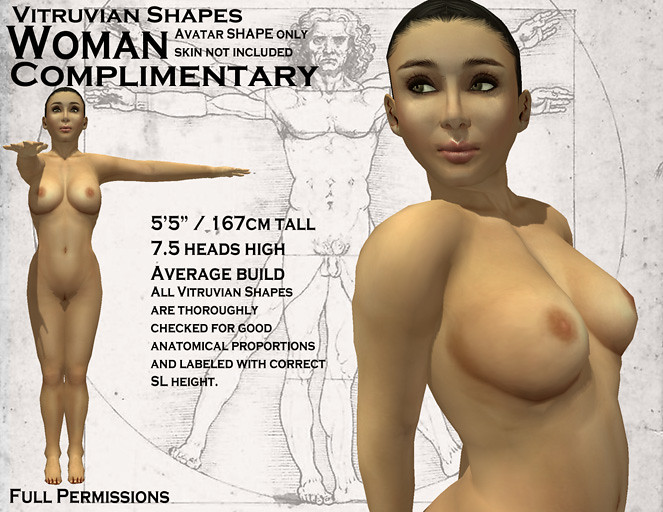
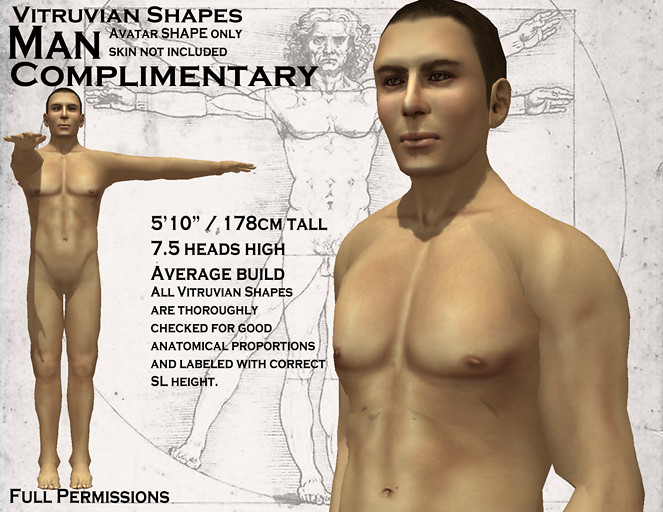
Vitruvian Shapes - Man and Woman

 This week I have a special addition to the Vitruvian Shapes line. Man and Woman.


 These shapes are the defining proportions for western men and women. Where I pushed more idealistic views of the male and female form, here I am presenting the average western adult bodies. If you want to see how the average man and woman stack up against the average SL avatar I am making it exceptionally easy, both shapes are being released free and full perm.


But don't think for an instant that these are your typical freebies. I put every bit as much effort into these two shapes as the previous entries to the Vitruvian Shape line. All of the rigorous measurements and proportion checking to ensure they're among the best shapes in SL.

 While I participate in the shape market due to the amount of work and effort it takes to make a truly good shape, I find it downright absurd that Linden Lab does not provide basic human shapes for those starting out in the virtual world. The appearance editor itself is overwhelming enough to make shape making difficult that starting users off with bad shapes just assured that poor proportions and bad scale would become the norm in Second Life, which causes no end of problems for content creation and is just one issue contributing to SL's reputation for extremely poor graphics.

 That is why I am also attempting to donate these shapes to the Second Life Library and encouraging SL to make use of these shapes, or any shapes made with proper scale and proportions, in their starter avatars and default shapes.

 These shapes are currently available on the SL Marketplace and my own in-world shops.

Enjoy!

Friday, August 5, 2011

One Last Release for Backlog Week! Pennywise Sculpted Stable!

While I was on vacation I set a goal for my return. All week long, Monday through Friday, I would release one item from my backlog a day.

 On Monday I updated my cow spot tattoo layer with a tintable version I'd had in my inventory for months.

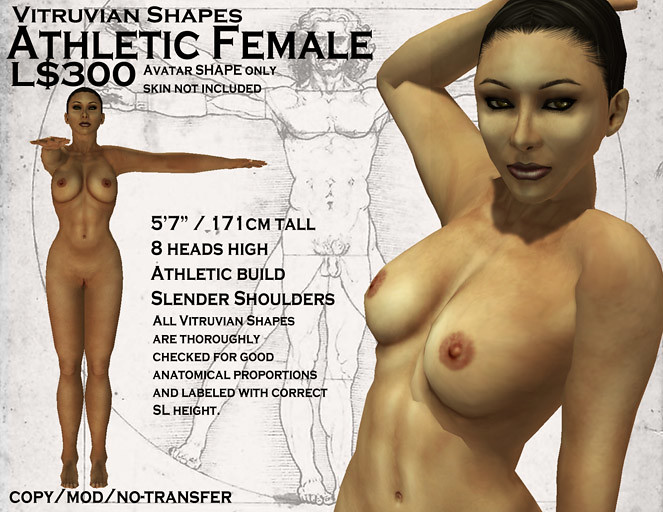
 Tuesday was a double! The first two shapes in my "Vitruvian Shapes" line! Athletic Male and Athletic Female!

When Wednesday rolled around I released a new outfit titled "Cowprint & Straps", a cowprint shirt with matching arm and leggings and a set of prim chest straps.

 Thursday brought another double, the next two "Vitruvian Shapes", Heroic Male and Amazon.

 And today I wrap up Backlog Week with the Pennywise Sculpted Stable!


This 23 prim prefab comes fully decked out with a water trough, some hay sculpts and a pitchfork! Without the extras, the stable itself is only 13 prims, 12 if you remove the floor and just use the ground.

 Like almost everything this week, this is something I'd had done or mostly done for ages now. I used it in both the Island of Milk&Cream and my own private home.

For the one at my home I removed the floor and re-textured the hay bales to match the hay ground texture.
 Now, I primarily cater to realistically sized avatars, so the stables come in 1=1 scale, with a ceiling far too low for your typical SL avatar with LL's awful camera placement. But, I also included a modified version with the ceiling raised to 3.5m, which is good for most SL avatars using default camera settings and the whole thing is also moddable so you can make it larger pretty easily. Using the stretch tool alone you can get the build large enough that the ceiling is nearly 4m high, which is plenty for anyone.

 At only L$200 it won't put a huge dent in your wallet, either!

 And so concludes Backlog Week! I don't plan on doing any releases over the weekend but I've still got a lot of unreleased stuff so I might try and aim for a "one new item a week" goal from here on out. No promises, but if nothing comes up offline I don't see why I couldn't manage that.

Thursday, August 4, 2011

Vitruvian Shapes - The Hero and the Amazon

 I really hadn't intended to do another shapes release so soon, but when the muse climbs in your window and threatens you with a knife you get to work!

 As promised, this second set is for all the muscle men and women out there. "Heroic Male" is that guy so many in SL seem to want to be. Over 6' tall, broad shouldered, barrel chested, throbbing pythons of steel. A shape for a super hero or a mythical warrior.

The man your man could smell like.
 So many SL men fall tragically short of this in their attempts. Most of the "muscular man" shapes I've seen have been 8' or taller, with maxed out muscle and shoulder sliders. Guys, that does not look "badass", it looks...pretty hilariously bad. Especially when combined with the stubby short arms, the wasp waists and the stork-like legs that are so common in SL.

 Seriously, not heroic looking and certainly not attractive in the slightest.

 Of course, being that it is SL, this 6'3" adonis is a midget compared to most SL men. Due to SL's well documented scale issues most SL men are at least 7' tall, with many pushing 8-9' tall. So, like the rest of the Vitruvian Shapes line, this is for people trying to break that mold.  An option for those who are trying to scale down, but still want to look like a super hero.

 Paired with this release is the "Amazon".

I can't get the phrase "death by snu snu" out of my head for some reason.
  I'm pretty happy with how Amazon turned out, except that the arms are a teensy bit too short. Still within acceptable limits but for a muscled amazon warrior I would prefer to emphasize the arms a bit more or at least have them "average" instead of on the short side. Unfortunately, Linden Lab skewed womens' arms shorter than mens' in the appearance editor.Once you push 6' and taller it becomes more and more difficult to have properly sized arms.

 Still, being SL, the arms on this shape are still way longer than the average SL avatar, which tends to look like a thalidomide victim.

 Another side note about Amazon. I originally had a shape all set to clean up and use for this, from an old avatar I'd made ages ago for RPing a space marine at Doomed Ship. When I dug it out of my inventory it was so bad I had to abandon it completely and start over. I may go back and redo that avatar with this shape and skin.

 I still have three or four women shapes that only need a little bit of proportion checking and cleaning up to be ready for the line, but only one male shape more or less ready to go. The male shape is for the "average Joe" look. Beyond that I still plan to go right down the line with shapes covering all the popular body types.

Wednesday, August 3, 2011

Vitruvian Shapes Update

Update - As of this morning (8/4/11) LL has unblocked the listing. No apologies or anything but it is back up. Found it funny that they didn't unlock it but leave it unlisted for me to correct the issue, they just tossed it right back out in the Marketplace.

Linden Lab has removed the listing for my "Athletic Female" shape. My fault, I forgot that the Marketplace Guidelines are inconsistent with the in-world guidelines for rating. I set the listing as "Moderate", which is what it would be in SL itself, but on the Marketplace it requires an "Adult" rating.

This requires an "Adult" rating due to the woman's nipples. Vitruvian Man's penis is family friendly "General" material.
Normally I'd find this mildly annoying, however Linden Lab has gone that extra step to make it a memorable occasion.

 I am unable to edit and re-list the shape.

 That's right! It's completely locked! There appears to be no way for me to edit the listing and get it back in the Marketplace.

 Even better! I discovered the issue when I went to list a new item that I had just spent several hours wrestling with a perms glitch to prepare for release, so I already had only the fondest feelings for everyone's favourite virtual world company.

 One person suggested I delete the item from my Magic Box and add the shape again, which would in all likelihood work, but the idea that I'd have to do that is just so unbearably stupid. Never one to do things the easy way I've filed a trouble ticket with LL instead.

 To say I'm not happy would be an understatement.