Why Linden Lab needs to present a more impressive image of Second Life and how they can achieve that.
Part 2
Ok, so we've shown how LL can encourage better looking avatars in SL, what else could be improved to make SL more visually appealing and nurture better looking content from the userbase?
LL needs to start providing better looking public areas.
That means the tutorial/orientation sims, the welcome areas/infohubs and any other "Public Works" projects.
How do I mean? Well, most people taking a look at SL are probably familiar with virtual worlds already. Videogames have been creating immersive, interactive virtual worlds to explore for several decades now, and when people look at Second Life's visual's they're going to be comparing it to the likes of these:
"Borderlands" for the Xbox 360
"Dead Space 2" for the PS3
"Twilight Princess" for the Nintendo Wii
"Shadow of the Colossus" for the PS2
"World of Warcraft" for the PC
These are the expectations set by about ten years of videogames. In contrast, this is the face Linden Lab puts forward for Second Life:
This was the Second Life website's mainpage image for a while. You can bet this is Photoshopped to look better than a straight screenshot, too.
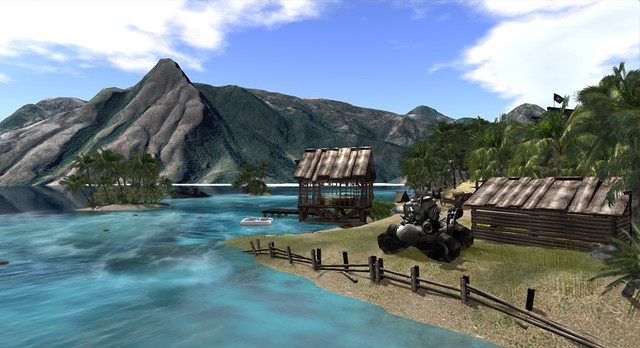
Another one taken straight from the official Second Life website. The hut is cute, but this showcases how users struggle balancing resources against detail and generally isn't a good shot to use in promoting Second Life.
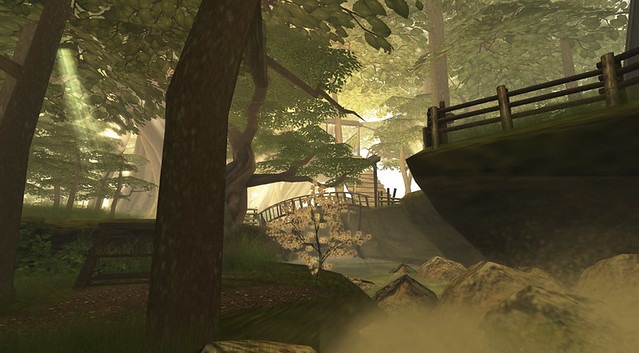
The Wilderness, a new area designed to test the new pathfinding features LL is adding soon is a huge step up from the average Linden developed content, but it's still not blowing the socks off of anyone.
What you can't see here are the alpha sorting issues resulting in an obnoxious flickering wherever one plant overlaps another, which is to say everywhere, because SL does not allow users to upload 1-bit alpha textures.
But let's look at how good Second Life can look.
The Cyberpunk City of INSILICO
The sci-fi horror sim, "Doomed Ship"
(I always find I have my highest SL framerates in this sim.)
The floating island of "Milk & Cream"
Would you believe that none of these three SL screenshots were taken with higher end features like shadows enabled? Also, all three predate the addition of mesh. My point being that it does not take a powerful computer to make SL look good if a sim is well made and employs good windlight presets.
So what is the deal? If SL is capable of looking as good or better than many popular, professionally produced videogames, why do the Linden sims and marketing screenshots all look so bad?
Well, a large part of it is just that LL does not hire professional artists to create their in-house content. They hire resident creators called "Moles", who are often amateur hobbyists who just happen to like building in SL. LL then provides them no real direction or support, as there is no in-house art team.
As a result, the environments created for Linden Lab suffer from a lot of recurring problems. Like a lack of proper scale, poor lighting, inefficient use of resources and no real sense of design.
Because of these issues Linden owned sims are often low on detail and content, spread out over much to large an area (making it a chore to wander between points of interest while exploring) and generally don't lead visitors through them like a proper environment (real or virtual) should.
Worse yet, the SL userbase as a whole is less likely to be exposed to quality builds which showcase Second Life's true potential. Such environmental pieces provided to the userbase via the Library, which new users often make use of to see how things are made, provide poor examples and instill bad building habits.
The obvious solution here is to hire better artists to build better environments, but it's not entirely that simple.
You have to realize that there are flaws with both the default SL visual settings, and the content creation tools themselves which make it extra difficult to create good looking environments in SL.
First, there is the whole issue of scale. I've written an entire article on that problem alone, so I won't repeat it all here. To summarize, almost all content in Second Life is built to double scale or larger.This spreads content out over a larger area (making sims more tedious to explore, those interesting buildings in the distance are twice as far away if the sim is built double scale) and puts a greater strain on resources while making it more difficult to create detailed, content heavy environments. In addition to making it more difficult to create better looking builds, this problem of scale also limits us creatively, by giving us a smaller land area to work with, respective to the size of our creations.
And why is everything in SL, from avatars to buildings, so oversized?
1. LL starts new users off with 7' tall avatars and provides incorrect height in the appearance editor.
This is solved easily enough by reducing the size of the starter avatars and correcting the bug displaying incorrect height in the appearance editor. Doing these things and given enough time, the trend will eventually be towards smaller avatars.
Can't see! Ceiling too low for the SL camera!
2. The SL camera placement is set unreasonably high above the avatar. forcing ceilings to be higher, forcing people to build larger in general.
Correcting these two issues and building Linden owned sims to more sensible scale would not only help Linden Lab create more impressive and engaging locations to draw new users into SL, but would free the userbase to take better advantage of scale in their own builds.
To be clear, tho, building to scale does not always mean building small. Linden owned builds should, primarily, be accessible by avatars of all sizes. However, that means building larger structures while maintaining correct scale. Windows smaller avatars can see out of, tables, countertops and chairs scaled to realistically sized human avatars with doors and ceiling heights accessible for dragons and werewolves.
As many of Linden Lab's builds are large, open affairs, this shouldn't be a problem. The idea isn't to restrict access to avatars of larger sizes, but to demonstrate scale.
Second, there is the issue of efficient use of resources. Linden builds often have a much higher land impact than they should need for the amount of detail present. Linden builds should demonstrate effective use of the tools available, including sculpts and mesh. This would allow them to showcase more detailed environments, while providing examples of how to create more detail in SL to the residents who examine these builds while learning how to create their own content.
Currently there are no tools in the viewer allowing the creation of either sculpts or mesh, despite the fact that user created in-world tools have shown how easy it would be to create a client-side sculpt creation tool that users familiar with prim building would find easy to use. Linden Lab should investigate the possibilities here.
In addition to good use of sculpts and mesh, Linden builds should demonstrate effective use of SL's native prim building system, demonstrating how more detail can be pulled from using cut, hollow and other prim features.
Providing full perm versions of well-made structures used in Linden owned builds via the Library could be a very good learning tool for new residents. Providing poorly made content this way hurts the ability of beginning builders to learn good building techniques.
Finally, there is the issue of poor windlight defaults. "Windlight" is Second Life's sky and atmospheric shader system. Proper windlight settings can make all the difference between an environment in Second Life looking awful or gorgeous, yet LL insists on using exceptionally poor settings for the defaults.
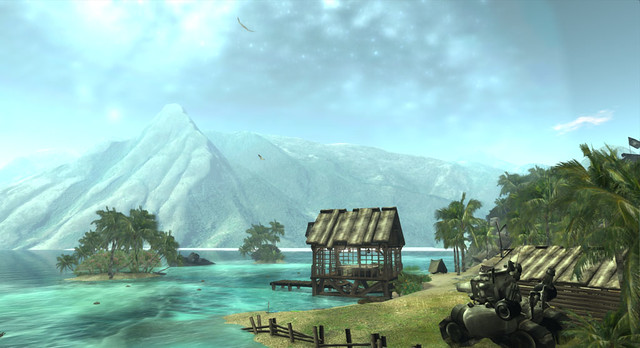
Here is a scene using the default sky settings:
And that very same scene with custom windlight settings;
Better windlight defaults would come at no performance cost to users, yet they have such a profound impact on visual the visual quality of Second Life. Few users see anything other than the defaults, except possibly when they enter a sim with it's own estate windlight settings. Others find the default settings so bad they stick to a single daytime preset and so never see the world as those around them do.
Beyond the problems, there's a few things Linden Lab really needs to keep in mind with their future building projects.
Lighting is often overlooked or poorly done in Linden owned builds. When creating public environments, Linden Lab should look for people capable of making good use of lighting, including high end features like projected lights. A good environment designer can balance the two so that whether or not a visitor has shadows enabled, the lighting should be suitable.
Linden builds are often guilty of using default settings on light sources when they use lights at all. A plain, white light with the only change being to increase the radius. These lights look horribly unnatural and tend to wash out nearby textures.
What's wrong with this picture?
This screenshot demonstrates a Linden infohub where the visible lights (the lanterns) do not cast any light in-world, but the potted tree does! The effect, of course, is off-putting. Darkness around all of the visible light sources, light being cast around the trees where no visible source is to be seen. Worse yet, every single potted tree in the infohub was a light source and there were 12 such trees on this terrace alone. This means constantly flickering lights for everyone without shadows enabled.
Lighting is so important to environment design that movie and game studios both tend to hire professionals that focus entirely on that.
Sound is another issue Linden Lab needs to be conscious of. Although it doesn't show up in screenshots, use of sound is vital in environment design, yet most Linden builds are entirely silent. Even in their "Wilderness" sim, an SL showcase currently being promoted to SL users with Premium accounts, very little use of sound. There's even a huge, multi-story waterfall that is entirely silent.
Like windlight, the camera FOV settings can be used to make SL look better without impacting user performance and framerates. I've found upping my FOV by a few levels (pressing ctrl+0 about 5 times) adds a much more cinematic sense of depth to SL's visuals, a trick used by a lot of modern videogames.
In closing, Second Life can be gorgeous, but few people, whether they're active Second Life users or people who've yet to try the virtual world, will ever know this unless Linden Lab makes a point of showing them.
Well made starter avatars, well made public environments like the Welcome Areas and Infohubs, and visually impressive windlight defaults can all be employed to showcase the potential in SL's graphics capabilities.
image of Second Life and how they can achieve that.
Part 1
There are three major complaints we often hear from those who have tried Second Life and given up on it.Three problems that are cited again and again as reasons why so many potential new users have left, never to return.
"It's ugly."
"It's confusing."
"There's nothing to do."
Volumes could be written about all three of these problems, but right now I'm just going to focus on the first. "It's ugly."
An SL promotional image straight from the official website. Note the simple geometry of the environment, the apparent absence of shaders, the girl with hair that doesn't appear to fit her head, and the 8' tall man whose proportions indicate he was put through Willy Wonka's taffy stretching machine.
It really must be said that Second Life is ugly. This is not in question. There is no debate to be had here. Second Life is ugly. Anyone who says otherwise is either in denial or has no frame of reference.
Choose your appearance from misshapen mutant humanoids, mismatched parts from furry avatars slapped on hastily made shapes, or some nifty looking robots and vehicles! Do you feel pretty yet?
Oh, sure, there is content within Second Life that can, under the right circumstances, be gorgeous. Believe me, I'm well aware of how good SL can look. It's just that arguing this in the face of how ugly SL is to the average new or ex-user misses the point entirely.
Most SL users, even those that stick around for years, will never see anything in SL that is anywhere close to how good SL is capable of looking. This isn't because their computer isn't up to rendering all the pretty effects, either.
You also need to get it out of your head that it takes a monster of a computer to make SL look good. That is simply not the case. While you won't get all of the shiny features that really make SL gorgeous, you can still make SL look great on 10 year old computers, or a machine you would put together today for under $500.
No, this is all about design and Second Life's default settings and starter content. That's where the biggest problems are.
How do I mean? Well, let's start with a new user's very first impression of SL. The starter avatars.
Currently, new users are offered a pretty wide selection of avatars to choose from when they start. I'd go so far as to say too many. Still, the human starters all share a lot of the same common flaws, and as most people signing up are likely to choose a human avatar they're a good place to start.
Long time SL users will often comment about how the starter avatars in recent years are a huge improvement over the early starter avatars foisted on SL from the beginning up until about 2010 or so. However, "better than what they used to have" isn't exactly a stellar recommendation, and new users aren't likely to have their impressions of the current starters influenced by how bad the starter avatars were in 2005.
If you're the average person, you'll probably look at these and find none of them particularly interesting.You might comment on SL's poor graphics and chalk up the less than appealing selection to that. If you've had any art training, on the other hand, you're probably shaking your head and wondering how avatars with such poor proportions could have possibly gotten past Linden Lab's art director and been selected to provide new users with their very first impression of Second Life.
All of these avatars have tiny heads, absurdly long legs, and the women in particular have freakishly short arms. Why the women? Because the appearance editor was set up by someone completely unfamiliar with human anatomy. The arm length slider for women (but not for men) is skewed in such a way that you need to set your arm length around 80-100 (maxed out) to have just proportionately long arms, and if your avatar is much taller than 6'/183cm then it actually becomes impossible to have proportionate arms.
The shortest female starter avatar from the selection pictured is about 6'8"/203cm. All of the human starter avatars are similarly oversized, which creates other problems we'll get to later.
That's not the half of it. Once you actually log in, these avatars look even worse!
Since all avatars start with the same default animations, that girl in the red coat carrying the giant purse? That giant purse is constantly clipping through her legs and torso Not just a little, she shoves it right through her body, impaling herself completely like some sort of surrealist social commentary.
Also, invisiprims, a graphical glitch that used to be the only way of masking the avatar mesh to allow for things like shoes were disabled by LL over half a year ago now for anyone enabling shadows, meaning no matter which starter avatar you choose, if you want shadows on in SL you are now treated to this sight!
Lovely, isn't it?
That's right, Linden Lab is so concerned about making a good impression, most of the human starter avatars still rely on a glitch LL disabled over half a year ago now. Worse yet, since invisiprims still work for anyone who doesn't have shadows enabled, you will still see many avatars walking around broken, on your screen at least, because of this.
So how can Linden Lab make avatars look good?
Easy.
In an ideal world, Linden Lab would go so far as to create a brand new, better made avatar mesh and an all-new appearance editor to go with it, but for the purpose of this article we are only looking at how Linden Lab could easily improve the visual experience of SL with a minimal investment in time and resources.
First, LL needs to recognize that they need to address both the starter avatars and the avatar creation tools.
As far as the starter avatars go, the smartest route would be to provide a small number of impressive looking starter avatars to choose from. Don't try to sabotage the appearance of the starter avatars in the hopes that a desire for better quality will drive people towards user created avatars and accessories, instead let the desire for a unique appearance drive that desire.
Believe it or not, SL avatars can look pretty good. Here's some examples.
Not too shabby, eh?
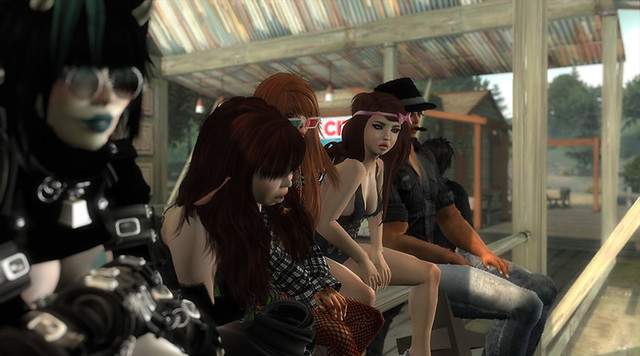
So if SL avatars can look like that, why do so many look like this?
Sexy!
Well, aside from the bad starter avatars LL foists on new users, there's also the issue of the appearance editor. Quite frankly, it's broken. I go over how in detail in "A Matter of Proportion" but I'll recap briefly here and see if we can point out more solutions to the problems.
1. When creating a new shape you are offered only two options, male or female, to start from. Both of these shapes have abysmal proportions (head too small, arms too short, legs too long, etcetera).
LL could vastly improve on this by providing multiple base shapes for people to choose from.The very first option you should have when creating a brand new shape is "what body type do you want?" Do you want a muscular super hero? A tall, thin super model? Do you want to create an overweight shape? Maybe you'd rather a more average body shape to start with? Each of these options should be properly scaled and proportioned to start with, letting you customize from there, rather than starting you with a 7' tall mutant with short arms and stork-like legs.
2. The height shown in the appearance editor is wrong. That's right, if you're using the official Second Life viewer, the height displayed in the appearance editor is off by about six inches, telling you that you're shorter than you actually are. If it says 6' even, you're actually about 6'6" or 6'7" or so. This encourages larger avatars, which creates more problems than you might initially realize. The most immediate being that the arm length slider for women maxes out with short arms if you go over about 6' tall.
LL could fix this by simply making the appearance editor show your correct height. Several popular TPVs accomplished this years ago, before LL opted to display avatar height in the appearance editor at all. That's right, LL added the feature broken, and worse they knew it was broken when they added it.
3. The proportion sliders are skewed in awkward ways. All of the sliders go from 0 to 100. You might assume that moving all of the sliders to 50 will give you an average sized human of average proportions. You'd be wrong. Instead, you'd get an overweight half troll, half Vulcan suffering from thalidomide poisoning.
Too sexy for this blog!
Worse yet, you run into issues like the fact that female avatars often find they cannot make their arms long enough to be proportional!You need to practically max out arm length to get proper arm proportions. Even that only works if your avatar is 6' or shorter, which is bad because LL starts women out at 6'4" and the tendency is towards larger avatars due to an irrational stigma against shorter avatars, which some claim are "childlike". Yes, you read that right, avatars shorter than 6'4" are considered childlike. Even if they're obvious non-humans like dwarves, goblins and aliens.
Sad part is, the guy enforcing the rule was going by the broken height mentioned earlier. So the real rule was a 5'3" (taller than the average adult woman's height in most of the world) minimum. And if you pointed that out they'd probably just ban you.
4. There are no guides to help you create a shape with correct human proportions. In addition to it being difficult, or in some cases impossible, to create a well proportioned shape from the horrible starting shapes, there are no tools or guides to make it any easier. The only way to even check your proportions is by rezzing prims while sitting on a pose stand.
LL could make it a lot easier to create better looking avatars if they added a set of visible proportion guides, like a silhouette, behind the avatar while editing your shape. Another very helpful tool would be a "proportion lock", which automatically kept your avatar in proportion. An optional lock that could be toggled on or off so no freedom to create deliberately non-human or stylized shapes would be lost.
5. There is no slider to scale an entire avatar larger or smaller while keeping their shape in proportion. That's right. If you adjust the "height" slider, you arms, legs and other body parts do not resize with your overall height. You'll quickly find your proportions entirely messed up if you alter height more than a few inches. This is made extra confusing by the fact that "Height" is not the only slider that affects avatar size. There are 8 sliders in all that affect your avatar's height.
Re-sizing a shape could be greatly simplified if there were a single "scale" slider that adjusted your whole shape, proportionately, as you re-sized yourself.
That about covers the avatar situation. To recap: 1. Provide a small selection of great looking, properly scaled and proportioned avatars that impress new users and give them a strong base to start from when they go to customize their appearance.
2. Provide a range of pre-made, properly scaled and proportioned body types for people to choose from when creating a new shape. (Bury the old shapes in the depths of the Library.)
3. Fix the problems with the appearance editor that make it more difficult to create good shapes. Fix the way proportion sliders are skewed between male and female shapes.
Fix the torso muscle bug that breaks increasing torso muscles beyond 50 on the female shape.
Show correct height.
Provide proportion guides and a "proportion lock" that can be toggled on/off.
Provide a single slider that scales an entire avatar larger or smaller while keeping their body in proportion.
If Linden Lab can manage all of that, then "ugly avatars" will no longer be an obstacle to drawing in new users, or retaining those they attract already.
To be continued in part 2 where we will look at how LL can create better environments for public sims while also nurturing better looking community created environments.
That's right, I've made all of my Vitruvian shapes completely free, making it that much easier for everyone in SL to have a great looking, properly proportioned shape.
I'm also working on some new additions to the line, which I hope to have ready soon. These will also be free upon release.
Since a lot of people seem to be having trouble with the new "Direct Delivery" setup on the Marketplace I didn't want to mess with the actual items, so the shapes on the marketplace are still no-transfer. The ones in-world are full perm. I'll make the marketplace shapes full-perm just as soon as it seems like doing so will be relatively headache-free.
I've attempted, twice now, to donate the shapes to LL. Still waiting on them to get back to me.
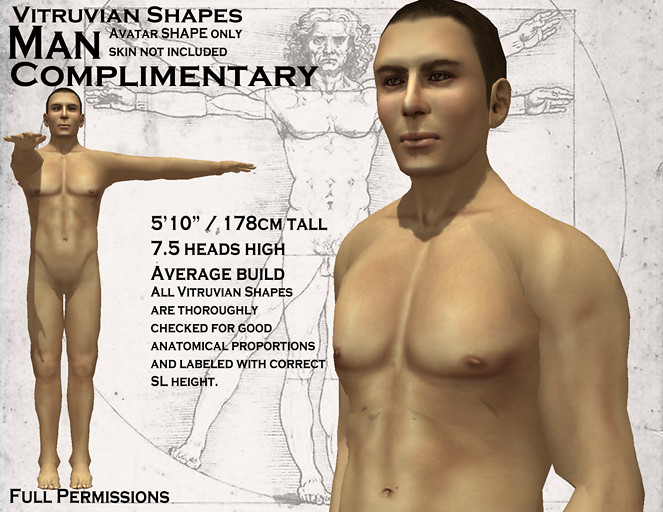
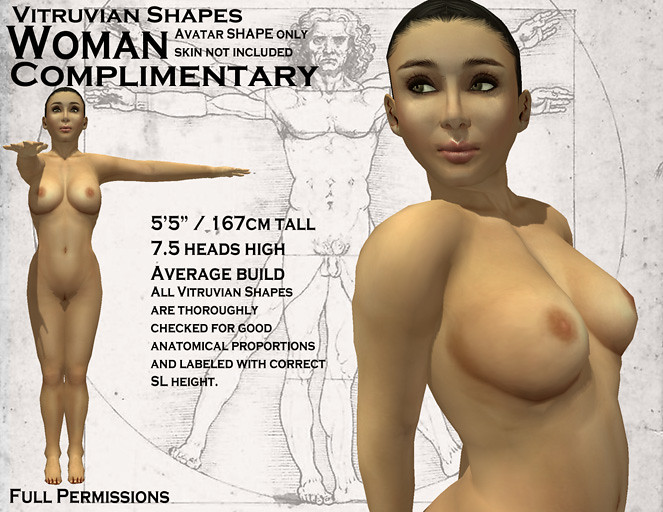
This week I have a special addition to the Vitruvian Shapes line. Man and Woman.
These shapes are the defining proportions for western men and women. Where I pushed more idealistic views of the male and female form, here I am presenting the average western adult bodies. If you want to see how the average man and woman stack up against the average SL avatar I am making it exceptionally easy, both shapes are being released free and full perm.
But don't think for an instant that these are your typical freebies. I put every bit as much effort into these two shapes as the previous entries to the Vitruvian Shape line. All of the rigorous measurements and proportion checking to ensure they're among the best shapes in SL.
While I participate in the shape market due to the amount of work and effort it takes to make a truly good shape, I find it downright absurd that Linden Lab does not provide basic human shapes for those starting out in the virtual world. The appearance editor itself is overwhelming enough to make shape making difficult that starting users off with bad shapes just assured that poor proportions and bad scale would become the norm in Second Life, which causes no end of problems for content creation and is just one issue contributing to SL's reputation for extremely poor graphics.
That is why I am also attempting to donate these shapes to the Second Life Library and encouraging SL to make use of these shapes, or any shapes made with proper scale and proportions, in their starter avatars and default shapes.
These shapes are currently available on the SL Marketplace and my own in-world shops.
When I talk about proportions in Second Life, particularly proportion mishaps that are common in SL, a oft repeated rebuttal I see is "In Second Life we can be whatever we want, so why do you want everyone to look like their real world self?"
The answer is simple, I don't!
In all my talk of scale and proportion you'll never find me saying everyone should model their avatar after their real world self. My own avatar is hardly "realistic", and a couple of people have pointed that out, as if suggesting I'm hypocritical in my talk of proportions.
Let me put it this way. Recently someone said to me that most people find normal human proportions"ugly" and that they'd rather look like a J. Scott Campbell illustration.
I emphatically agree!
The thing is, Mr. Campbell understands human proportion and uses that understanding to craft attractive figures.
Below, I've taken a Campbell figure and overlayed the same proportion guides I use in Second Life when discussing proportions.
To look like this in SL, as much as to draw a figure like this,
requires an understanding of realistic proportions.
As you can see, the lady here is just over 8 heads tall. Probably about 8 and a quarter. So she has a much larger head than the average SL avatar.
She also has a wingspan comparable to her height. It's actually slightly longer to emphasize the tall figure and compliment the longer legs, which are only slightly longer than half her height as I suggest for those intending a "long legged look" in SL. Longer arms are part and parcel with longer legs.
None of this is by accident. It all comes from a basic understanding of human proportion and how to manipulate it to achieve a desired appearance.
This article is intended as a guide to better understand the Second Life avatar mesh and appearance editor, as well as how the broader principles of human anatomy apply in achieving desired body types and appearances.
A Matter of Proportion
How better understanding of human proportions and the Second Life appearance editor can help users create better avatars.
It is impossible not to think of the avatar when you think of Second Life. The avatar is the very face of the virtual world and the basis around which all content in Second Life is created.
Despite this, the avatar creation process is probably the least understood aspect of content creation in Second Life.
The appearance editor itself is a part of the problem. Nine pages of abstract sliders with seemingly arbitrary 0-100 settings for each aspect of the body shape. A remarkable amount of freedom is handed to the user, however the default shapes provided are poorly made and there are no guides or tools built into the appearance editor to help the average user, someone with little to no understanding of body proportions, create a believable, let alone attractive, shape.
Given just how bad the proportions of the starter shapes are, users who do want a good shape are forced to remake the avatar one slider at a time. Since few SL users are actually professional designers with the understanding of human proportions the appearance editor demands, most are left frustrated and entirely convinced that the avatar mesh and appearance editor are more limited than they actually are.
Human Proportions
To get the most out of the SL appearance editor, one really does need to have at least a basic artist's understanding of the human shape.
The Roman architect Vitruvius wrote about his observations of the human body about 2,000 years ago. Leonardo da Vinci improved upon man's understanding of the human body around 1487. Most people are at least passingly familiar with his sketch "Vitruvian Man".
This wasn't just a random doodle of a naked guy, but a scientific study of the human form based on the writings of Vitruvius and Leonardo's own observations.
While no one would suggest human bodies are all identical in proportion, there are certain average proportions one can expect any given human body to more or less conform to. Leonardo's image is sometimes referred to as the "Canon of Proportion", reflecting the average adult human proportions. Over the centuries artists and scientists alike have remained fairly consistent with this understanding.
The average North American/Western European man is about 5'10" or 178cm tall.
If you take the height of the average man's head and use it as a unit of measurement against his height you will find that the average man is about 7.5 head units tall with the centre of his height being just above where his legs meet his groin so that his legs make up just shy of half his overall height.
Stretching his arms out to either side, the average man's "wingspan" will be more or less equal to his height. With his arms at his sides, the average man's fingertips will reach just past mid-thigh.
Keeping his arms at his sides, we see that the average man is about two head units wide at the outside of his shoulders. Thinner at the hips, which are about as wide as where his shoulders meet his torso, allowing his arms to hang straight down.
A couple of other helpful proportion tips to keep in mind, the average man's hands are about the size of his face. The measurement from the base of his palm to the end of his longest finger being equal to the measurement from the base of his chin to halfway between his eyebrows and hair line. The average man's feet are about as long as his forearms measured from the wrist to the elbow.
Of course, it bears repeating that bodies rarely adhere strictly to these proportions. These merely represent the average adult proportions. Understanding them is key to using proportions to achieve specific body types.
The above image illustrates a few examples of commonly accepted proportions used in distinct body types.
"Idealistic" of course, represents the common vision of the "ideal" adult male body. It's still believable but presents the most idealized proportions based on what is commonly considered attractive. The "ideal" man is taller and since our heads don't grow all that much as we get taller he winds up a full 8 heads tall. He is 2 and 1/3 head units wide at the chest, emphasizing a strong upper body.
Our "ideal" man here would likely be a couple of inches over 6' tall.
From there the chart moves on to the unrealistic, yet artistically accepted, realms of fashion illustrations and heroic depictions. "Heroic" would be the statues of Greek Gods or contemporary depictions of many modern day super heroes. Usually the more musclebound sort.
For instance, Superman would likely be depicted as a "Heroic" body type. Spider-Man, on the other hand, would more likely be depicted as an athletic yet wiry "Average". The X-Men's Wolverine would be an oddball on this chart. Short, yet burly, at only 5'3"/160cm but with broad shoulders and emphasized arms like "Heroic".
You can see from this line up that head size is used to emphasize height and muscle mass. If we re-sized all of these figures to be the same height and broke the image up so you didn't have a direct side-by-side comparison then you would still get the impression that the "Heroic" figure was much taller than our "Average" or "Ideal" figures.
The wider torso emphasizes the upper body further adding to the sense of muscle mass and strength. You can emphasize upper body strength even more by shortening the legs slightly, relative to the torso, and lengthening the arms. Push that too far, however, and you wind up with a very "cartoonish" or ape-like figure.
Team Fortress 2's "Heavy Weapons Guy" is a good example of these principles taken to a deliberately cartoonish extreme.
Women's proportions are very similar to men's in terms of head size, arm length, et cetera. Women are generally 7-8 heads tall, 2 heads wide at the shoulders. They generally have a wingspan more or less the same as their height and legs that make up half their height. The primary differences are in the chest, waist and hips, with more subtle differences adding up to a distinctly female form.
Whereas men tend to have their upper body and muscles emphasized for attractiveness it is more common to emphasize the hips, legs and bust on women. For example, where you might lengthen the arms on a male shape to give him a stronger look you would instead lengthen the legs on a woman to make her more attractive. Only a few inches, mind you. Push the legs too long and you wind up with a stork-like figure.
Head size is another area where male and female shapes can differ for effect. You don't necessarily want to emphasize a muscular upper body if you're going for a cute or sultry look. Making the head larger, until the figure is 6.5-7 heads tall, can result in a smaller, "cuter" look. Slender shoulder are also often appealing in female shapes.
With the body, an "hourglass" figure is the classic ideal of beauty. This is most often accomplished with a thin waist and slightly exaggerated hips and bust of about equal width. Some confuse this with the shoulders, when in fact, on women as well as men the shoulders should be wider than the hips, allowing the arms to hang straight down.. Wider hips result in a "pear-like" shape.
Proportions also change over age, as demonstrated in this image.
Note that these are "idealized" proportions, rather than "average".
Of course, that is all a very simplified version of proportions, but it should do for anyone trying to make a decent shape in Second Life.
The Appearance Editor
Of course, one also needs to understand the Appearance Editor itself. It's not as simple as one would think it should be.
The first sign that things are not as they should is that the height displayed in the appearance editor is incorrect. It is short by about half a foot ( 15-16cm ) or more. Meaning, if the appearance editor gives your height as 6'/183cm then you are actually closer to 6'6"/198cm.
This is mainly true of Linden Lab's official viewers, most third party viewers (such as Phoenic, Imprudence and others) display correct avatar height. Linden Lab acknowledged this bug at the release of Viewer 2.1 however, as of this writing and the release of 2.8, the bug has yet to be corrected.
One often asked question is "what do the sliders represent in terms of real world measurements?" In other words, how tall would a given number, say 50, be on the Height Slider? The answer is that the sliders are entirely abstract, the numbers do not equate to any sort of real world measurements. Nor could they, as the proportions adjusted by any given slider may also be affected by several other sliders. For instance, no less than eight sliders affect an avatar's height.
This ties in with the misconception that a setting of 50 on any of the shape sliders is the default, unaltered model shape, that if you set all the sliders to 50 that would be the original, unaltered avatar model mesh SL uses, a shape people believe represents "Average".
That is a very reasonable assumption, however it is entirely incorrect. This is what you get when all of the sliders are set to 50.
Not the average human body, certainly not the mesh model in its original, unaltered state.
It gets worse.
Some appearance editor sliders are also inconsistent between genders. Setting the arm length slider to 70 on the male avatar mesh will get you substantially longer arms than the same setting applied to the female mesh.
The difference is so substantial, in fact, that it is literally impossible to make proportional female arms for some body types, especially taller women. The taller your avatar is, the more difficult it is to make the arms correctly proportional. Go past about 6'/183cm and it becomes pretty much impossible. This is made worse by the fact that Linden Lab starts women off with avatars over 6' tall.
The same issue is observable with leg length, except reversed and to a lesser degree. You will have no difficulty making proportionately long legs for either gender, but the sliders are skewed towards longer legs for women.
There are other bugs as well, such as the broken torso muscle slider for the female avatar. The torso muscle slider for women will change the muscle mass from 0-50, but it has no effect from 50-100. The only work-around is to save the shape as male, re-enter the appearance editor to adjust the muscles on the male shape, then change back to female and save it.
Another common misconception is that all one needs to do to scale their avatar larger or smaller is adjust the height slider. This is incorrect as thje height slider does not "scale" your overall body up and down, it squashes and stretches. Meaning, once you adjust the height slider you need to adjust all your other proportions to match your new size.
Avatar Size
Let's take a look at avatar size and height.
As mentioned earlier, eight sliders affect avatar height.
Height Head Size Neck Length Hip Length Leg Length
Torso Length also affects your height, but not in the same way as the others. As you adjust torso length the length of your avatar's legs will increase or decrease to keep you at about your same height. However, as you lengthen the torso the avatar legs will shrink slightly more, possibly leaving you shorter by a very small amount. A matter of centimetres.
In addition, Heel Height and Platform Height in the mesh shoe sliders can be used to increase your overall height.
We've covered that the slider numbers do not represent any sort of relation to average proportions, that the appearance editor displays incorrect height and that no fewer than seven sliders affect your overall height.
So just how do we know how large our avatar shape is?
The easiest way is to simply add 6 inches ( 15-16 centimetres ) to the height displayed in the appearance editor. So if it says that you are 6' even, then you are actually about 6'6". This, of course, won't be exact, but it will be close enough for a general idea.
Alternatively, there are scripted height detectors that were made specifically to compensate for Second Life's misreported height. These are also inexact, but good to within a few centimetres. To know if a given height detector is compensating or not check to see if it matches the height in LL's appearance editor. If it is about 6 inches shorter, then it is good.
If you are working on a shape that includes prim parts to make yourself seem larger (like furries, robots, werewolves and such) remember that no scripted or client based height detection will take prims or animation hacks into account, so the only way to get your accurate height is the following.
The only certain way to get your avatar's exact height is by using a pose stand and stretching a prim from the bottom of your avatar's feet to the top of your avatar's skull. All Second Life prims are measured in metres. Prim measurements also match land measurements. If you are unfamiliar with metric measurements here is a link to an online conversion calculator.
So just how short/tall can an avatar be?
That depends on whether you are using the male or female shape. Linden Lab made male shapes capable of being larger. The tallest you can possibly be with the male shape, using only the avatar mesh itself, is 8'10"/2.61m tall. To get this tall you need to make use of the mesh "shoe" sliders as well as the base body sliders. Without the shoe options you can still get the male avatar height to an impressive 8'3"/2.54m tall.
The female shape can be made as tall as 8'6"/2.61m, or 8'2"/2.44m tall without the shoe sliders.
To put that in perspective, the tallest living man today, as of this writing, is a Turkish man named Sultan Kösen who stands at only 8'3"/2.51m tall. The average NBA basketball player is diminutive 6'7"/2.01m and the average North American man is a miniscule 5'9"/1.75m or 5'10"/1.78m depending on the source.
At the opposite end of the scale the smallest shape I have made while retaining adult proportions has been about 4'11"/1.50m tall, although you can go shorter still discarding adult proportions. I would actually encourage content creators to create such shapes for attachment building. The smaller you create attachments, the more avatars they will fit. (It's far easier to scale up an attachment than scale one down, due to minimum prim sizes.)
At the extreme smallest end, without any hacks, you can squeeze an avatar down to at least 4'1"/1.26m tall. About the size of a 9 year old boy, but lacking proper 9 year old proportions.
This is the shortest avatar shape I've managed. All shorter avatars
I've seen were made with hacked viewers and animation tricks.
About the youngest it would seem you could manage while maintaining correct proportions and average height would be about 11 years old.
Creating A Shape
With a basic understanding of human proportions and the quirks/bugs of the appearance editor, it is possible to create decent shapes in Second Life.
You will need only two things to get started.
1. A small piece of land where you have rez rights and prims available. A sandbox will work nicely.
2. A pose stand with a classic "t-pose" and an "arms at sides" pose. If your pose stand does not have an "arms at sides" pose, an "arms straight forward" pose will work almost as well.
Next you will want to press ctrl+p to open the Second Life Preferences panel. Go to the "Move and View" tab then look for "Automatic position for:" and uncheck the box next to "Appearance". This will allow you to enter and exit the appearance editor without being kicked off of your pose stand.
Before you get to shape making, remove all attachments. Especially shoes and hair (unless prim body parts are a part of the shape you intend to create), also remove any shoe clothing layers (unless the shoe layers are being used as a part of your base body shape).
The first thing you will want to do is determine the desired size of your avatar.For a plethora of reasons I would recommend aiming for a believable size unless your avatar is something deliberately larger or smaller than a human, such as a minotaur or a dwarven warrior.
The best way to do this is to decide the height you would like your avatar to be, convert it to metric and create a prim that size to use as a guide. Position the prim next to your avatar and scale your avatar down using the height, neck length and leg length sliders until your avatar is about the height of the prim.
At this point you do not need to be exact, as your height will be fluctuating as you edit proportions.
Second, you want to adjust your head size. Rez a cube and set the transparency to 50%, then place the prim over your head. Stretch the prim until it is the same height as your head, from the bottom of your chin to the top of your skull. Copy the side to the rest of the cube's dimensions. That represents "1 head unit".
Copy the prim down until the last one reaches past your feet then count the number of prims. That is how many heads tall your shape currently is.
As the SL starter avatars and default shapes tend to have abnormally small heads you may need to increase your head size and repeat this process several times until you achieve a head to body ratio you are happy with. The taller your avatar is the smaller your head should be relative to your body.
A 6' tall adult would be about 7.5 to 8 heads tall. A 6'3"-6'4" tall person may be between 8 and 8.5 heads tall. A 5' tall adult might be closer to 6.5 to 7 heads tall.
Remember, you have more proportions that need adjusting yet, so if your head size has you around the desired 7.5-8 heads tall range yet still looks too small that may change as you adjust torso and shoulders.
First, however, we move our attention to the leg to upper body ratio. The middle of your avatar's crotch should be about the middle point in your body if you are aiming for "ideal" proportions. Copy your height cube from earlier and stretch the top down to the bottom of your avatar's crotch then tint it green. Copy the prim upwards until it is end to end with the first, tint this second prim orange.
The prims in this image are actually even with the base of the feet and the top of the skull. Perspective plays tricks.
For idealistic shapes, leg length should be about equal to the upper body length, meaning the top of the orange prim should rest about even with the top of your avatar's skull. You can shorten the legs slightly, by up to a few inches, to get a more muscled look that emphasizes the upper body.
Women can achieve a "long legged" look by increasing the leg length by a couple of inches. It doesn't seem like much, but a combination of such small changes in proportion can completely alter perception of a figure.
Also keep in mind that you have three sliders to adjust at this point. The leg length slider, torso length slider and neck length slider. Remember all three sliders affect your height, but the torso slider affects it the least, meaning less adjusting og head size later if most of your adjustments are with the torso slider. Just try to avoid a squashed/stretched torso look.
With that taken care of we'll want to take a moment to check height and head ratio again. Make sure you're still about the height you are aiming for and the proper number of heads high for your desired body type. Since you should not be off too much you can probably make small adjustments to the height slider to get back to where you'd like to be. Otherwise adjust head size and re-check the head to body ratio.
Now we move on to the upper body proportions.
As you can see, this shape is slightly wider than 2 heads at the shoulders.
You'll want a good "arms at sides" pose, lacking that a pose with your arms straight forward. Measuring your torso width to the outside of your upper arms you should be about two head units wide. If you are going for a muscled, burly look you may want to be slightly wider than 2 head units. The "Heroic" shape in our figure lineup is 2 and 2/3 heads wide.
For a more slender look you can narrow the width here slightly. Be careful, too much and you will wind up looking more child-like or pear shaped if your avatar has wide hips.
You have the Shoulder Width, Body Thickness, Body Fat and Torso Muscle sliders at your disposal to balance out a good torso width.
Next we take a look at our avatar's hands.
The average adult's hand is roughly the size of their face. That is, measuring from the bottom of the chin to about halfway between the eyebrows and hairline should equal the measurement from the base of the palm to the tip of the longest finger.
Some men may like to go slightly larger for that "big, strong hands" look, but too much and it will look cartoonish.
Once the hands are a good size we move on to the wingspan, which is the measurement of your arms stretched out to either side. The measurement of your wingspan relative to your height is known as the "ape index". The "ideal" adult shape has a wingspan that is equal to their height.
We can measure this on our avatar by taking the prim we used to measure our avatar's current height, centering it with the body of our avatar and flipping it on its side.
Keep in mind that the avatar bends the shoulders in an odd way, squishing them into the avatar torso slightly. You can account for this by making your wingspan an inch or two shorter on each end than the height prim. Extend all the way to the prim for slightly exaggerated arms.
Overly muscular men may wish to make their arms slightly longer to emphasize upper body strength. Remember that making the arms too long results in an ape-like or cartoonish look. Short arms are generally considered unattractive so you want to be sure that your arms are at least within a couple of inches of your height.
Once we're satisfied that our avatar's arms are the proper length we can check our feet. The "ideal" adult's foot will be as long as their forearm, measured from the wrist to the elbow.
As you finalize your shape here are some more tips and reminders.
Your hips are not as wide as the outside of your shoulders. Where the "ideal" adult shape is 2 heads wide at the outside of their shoulders they are only 1 and 1/2 heads wide at the hip. Women's hips are accentuated by a thin waist. The "ideal" woman shape is 1 head unite wide at the waist.
Breasts, belly, bodyfat and other shape attributes tend to distort when pushed to either extreme. Try to find a good balance.
Even the "ideal" body shape should have a bit of bodyfat. As a practical issue, body fat of zero increases unnatural looking sharp edges on the avatar shape.
If you are not well versed in human proportion and anatomy then search the web for figure drawing and other proportion guides that may help you with aspects such as facial features and achieving specific body types.
Improving the Avatar Creation Process
The Second Life Appearance Editor is in dire need of an overhaul, but here are a few ideas Linden Lab could possibly implement to make the avatar creation process easier and more fun for users of all skill levels.
Most videogames avoid Second Life's avatar creation issues in two ways.
First, they limit the user's ability to adjust the body shape.
In some games and virtual worlds you are only able to adjust facial features. "Oblivion" and the more recent "Fallout" games are examples of games which only allowed players to alter the head, face and skin tone of their character. Attributes like body shape and height are locked. The virtual world "Blue Mars" took a similar approach, locking all avatars to the same height.
The character creation screen from "Fallout 3".
Second, and better for Second Life, they provide "template shapes" for people to start from.
"Champions Online" and "City of Heroes" are perfect examples of this. During the character creation process you choose from one of several body types (such as slim, athletic, muscular, huge) and then customize your shape from the basic template provided. You can still go well outside normal human proportions, but the templates nudge players in the direction they want to go, making it easier for them to create shapes they are happy with.
Of course, Second Life is not typical of videogames. It has no burdens of gameplay mechanics requiring specific avatar sizes and SL's content creation benefits greatly from the exceptional amount of freedom allotted to avatar creators. It would be a mistake to place restrictions on avatar creation similar to the restrictions found in "Fallout" and "Blue Mars".
Still, with the amount of freedom granted to Second Life users it is necessary for Linden Lab to provide certain tools and guides so that one need not be a professional artist just to achieve results similar to what the user holds in their mind's eye.
Rather than hard proportion limits, Linden Lab could provide an optiona "Proportion Lock" which could be toggled on and off at the user's discretion. This would help those who desire human proportions stay within those limits without placing restrictions on those who desire the full range of possibilities currently afforded by the SL appearance editor.
When checking an avatar's proportions it is important to be able to see the avatar in multiple poses. The "t-pose" and "standing straight, arms at sides" pose are both universal proportion checking poses that the Second Life appearance editor lacks. To check your avatar in any pose other than default "appearance editing" pose LL provides requires fiddling with the Preferences and tracking down a user created pose stand with some good proportion checking poses.
Visible proportion guidelines and silhouettes would help immensely. Even the professionals do not work without the aid of guides. The appearance editor could be made to display head units automatically without the need to mess with prims, along with silhouettes of example shapes or guidelines displaying proper arm length relative to your height.
Finally, and perhaps most importantly, template shapes could be provided to new users both through the Library and within the Appearance Editor itself as options when creating a new shape. Such templates would need to be professional quality, with correct scale and proportions. SL's current human starter avatars and default shapes are all over-sized, suffer from poor body proportions and are generally unattractive.
It is much easier to create a tall thin supermodel or a short and stout dwarven warrior if you have access to body type templates that provide you a good basis to start from, rather than being forced to create the shape one slider at a time from a poorly made default of the entirely wrong body type.
Hopefully as Linden Lab seeks to make Second Life "fast, easy and fun", ideas such as these will be among those they consider for improving the avatar creation process.